
vFlat Scan - PDF Scanner, OCR
In-app purchases

star
178K reviews

Everyone
info
10M+
Downloads

Everyone
Learn more


About this app
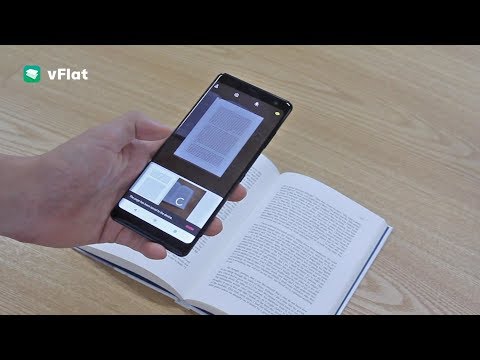
vFlat Scan is a powerful scanner app that automatically crops, flattens, and enhances images on your mobile device, allowing you to effortlessly scan, save, and share documents as digital files.
Convert images to text using vFlat Scan's text recognition (OCR) feature to copy, edit, and search for content in your documents.
Get unlimited scans without any annoying watermarks, ads, or sign-ins. Sounds too good to be true? Download vFlat Scan for free and start scanning right away!
NO ADS OR WATERMARKS
• Enjoy a complete ad-free UI with no sign-in required.
• vFlat Scan will not add watermarks to your scans.
CAPTURE DOCUMENTS
• Scan anything from receipts, books, forms, and notes without the need to manually crop them.
• Automatically detects document borders so you can get a clear-cut scan from any angle.
• Use Auto Scan to scan multiple pages in quick succession without needing to tap any buttons.
AUTO-FLATTEN & ENHANCE
• Documents are automatically flattened, even for curved book pages.
• Enable enhanced colors to boost color saturation and contrast for improved text visibility.
• Hide visible fingers in scans when holding books or documents.
SCAN TWO-PAGE BOOKS
• Capture two pages at once for better efficiency. Pages are automatically divided and saved.
• You can change the scan order to right-hand page first for right-to-left language books.
EXTRACT & USE TEXT
• Text recognition (OCR) allows you to extract text from any scanned image.
• Select, copy, and edit text directly in the app before sharing it as a Word or TXT file.
• Search for specific words or phrases across all your scans with extracted text.
TEXT TO SPEECH
• Text to speech (TTS) is also included. Play, pause, or skip to the next or previous sentence.
• Change the voice settings for faster or slower playback speed or different voice pitch.
ERASE HANDWRITTEN NOTES
• AI technology detects and removes all handwritten text or scribbles from books or other printed material so you can get a clean version of the document again.
SHARE FILES
• Scan, save, and share documents as PDF, JPG, Word, TXT, or ZIP files.
• Generate shareable URL links to view and download your scans via web browser.
vFlat does not collect your personal information or scans without your explicit consent.
Terms of Service - https://go.vflat.com/s/terms_en
Privacy Policy - https://go.vflat.com/s/privacy_en
Compatibility:
vFlat Scan is supported on devices running Android 8.0 or higher, with a minimum of 2 GB of RAM and OpenGL ES 3.1 or higher. Additionally, vFlat Scan is available for iPhone and iPad through the App Store.
If you enjoyed our app, please leave us a review.
We'd also love to hear your feedback. Please send us your comments and suggestions: support@vflat.com
Convert images to text using vFlat Scan's text recognition (OCR) feature to copy, edit, and search for content in your documents.
Get unlimited scans without any annoying watermarks, ads, or sign-ins. Sounds too good to be true? Download vFlat Scan for free and start scanning right away!
NO ADS OR WATERMARKS
• Enjoy a complete ad-free UI with no sign-in required.
• vFlat Scan will not add watermarks to your scans.
CAPTURE DOCUMENTS
• Scan anything from receipts, books, forms, and notes without the need to manually crop them.
• Automatically detects document borders so you can get a clear-cut scan from any angle.
• Use Auto Scan to scan multiple pages in quick succession without needing to tap any buttons.
AUTO-FLATTEN & ENHANCE
• Documents are automatically flattened, even for curved book pages.
• Enable enhanced colors to boost color saturation and contrast for improved text visibility.
• Hide visible fingers in scans when holding books or documents.
SCAN TWO-PAGE BOOKS
• Capture two pages at once for better efficiency. Pages are automatically divided and saved.
• You can change the scan order to right-hand page first for right-to-left language books.
EXTRACT & USE TEXT
• Text recognition (OCR) allows you to extract text from any scanned image.
• Select, copy, and edit text directly in the app before sharing it as a Word or TXT file.
• Search for specific words or phrases across all your scans with extracted text.
TEXT TO SPEECH
• Text to speech (TTS) is also included. Play, pause, or skip to the next or previous sentence.
• Change the voice settings for faster or slower playback speed or different voice pitch.
ERASE HANDWRITTEN NOTES
• AI technology detects and removes all handwritten text or scribbles from books or other printed material so you can get a clean version of the document again.
SHARE FILES
• Scan, save, and share documents as PDF, JPG, Word, TXT, or ZIP files.
• Generate shareable URL links to view and download your scans via web browser.
vFlat does not collect your personal information or scans without your explicit consent.
Terms of Service - https://go.vflat.com/s/terms_en
Privacy Policy - https://go.vflat.com/s/privacy_en
Compatibility:
vFlat Scan is supported on devices running Android 8.0 or higher, with a minimum of 2 GB of RAM and OpenGL ES 3.1 or higher. Additionally, vFlat Scan is available for iPhone and iPad through the App Store.
If you enjoyed our app, please leave us a review.
We'd also love to hear your feedback. Please send us your comments and suggestions: support@vflat.com
Fast, precise scanning with advanced AI. Strong privacy protection in a scan app
Updated on
Safety starts with understanding how developers collect and share your data. Data privacy and security practices may vary based on your use, region, and age. The developer provided this information and may update it over time.


Ratings and reviews
174K reviews

A Google user
- Flag inappropriate
June 2, 2019
Great concept. Unfortunately, my phone's camera (Galaxy S7 camera) works much better. This app is not as clear and auto-adjusts the frame. Most of the time, the frame doesn't capture all of the writing and it changes everything to black and white, which ruins pictures and diagrams. I will say it does a good job taking small curves towards the spine of a book and making them into a straight line of somewhat blurry or whited-out text. Hope this helps someone feel less disappointed.
49 people found this review helpful

Sean Dunn
- Flag inappropriate
September 21, 2020
This app is almost a 5 star app in my book. It takes pictures of pages quickly, the OCR is unchallenged, and the auto-crop is better than anything I could do manually. The only feature I feel is missing is the book storage (or essentially folder storage) or all the pages collected. If that existed, I would begin to actually do my reading within the app. I am not sure how you have not been offered huge deals yet, but keep up the good work my man!
92 people found this review helpful
VoyagerX
September 24, 2020
Thank you for using vFlat and letting us know your pain points. We are currently working on folder storage , so please stay tuned with us. Thank you!

H. Louise
- Flag inappropriate
December 6, 2022
I'm astonished by this app! I have no idea how it translates my photos into scan-quality images (or pdfs), but it does, and with ease. My phone does get a bit hot when using the app, but this may be specific to my model (Google pixel, which, despite this minor qualm has one of the best cameras on the phone market). Would absolutely recommend to a friend, especially those in school.
23 people found this review helpful
VoyagerX
October 12, 2023
(auto translated) Hello user! Thanks for using vFlat and leaving a review. We will continue to try to develop the app further by reflecting users' opinions. Thank you.😌
What’s new
- Invite Friends (Earn Rewards)
Recommend vFlat to your friends and get more free allowance! Share your invite link or code to unlock extra rewards for both of you.
- Free Monthly Allowance
Easily track and manage your free monthly allowance and extra rewards earned from invites in one place.
- App stability improvements and bug fixes
Recommend vFlat to your friends and get more free allowance! Share your invite link or code to unlock extra rewards for both of you.
- Free Monthly Allowance
Easily track and manage your free monthly allowance and extra rewards earned from invites in one place.
- App stability improvements and bug fixes
Everyone
Learn moreApp support
About the developer
(주)보이저엑스
devadmin@voyagerx.com
서초구 서초대로38길 12,
10층(서초동, 마제스타시티 타워1)
서초구, 서울특별시 06655
South Korea
+82 10-3002-5189


