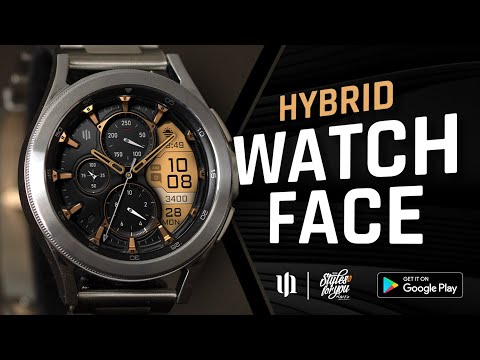

S4U Assen - Hybrid watch face

star
3.26K reviews

Everyone
info
100K+
Downloads

Everyone
Learn more


About this app
Enhance your Wear OS experience with the S4U Assen. A realistic analog watch face with an additional LCD screen to display some useful information. You can customize the colors, hands and have the option to set additional complications.
✨ Key Features:
- Realistic hybrid dial (digital and analog design elements combined).
- Color customization (13 LCD colors and 10 index colors).
- 4 custom complications (for user-defined data).
- 3 custom shortcuts to access your favorite widget
- 4 custom clock hands
- 3 second hand motions
- 2 custom small hands
- 3 AOD brightness levels
- Watch face displays time, steps, heart rate, day of the week, day of the month, number of unread messages + 2 custom complications
****
⚠️ IMPORTANT: Compatibility & Installation
This app is optimized for the new Watch Face Format regarding Wear OS 5 (API 34+). Compatible devices include:
- Samsung Galaxy Watch 8, Ultra, 7, 6 , 5, 4 (Wear OS 5 update required)
- Google Pixel Watch Series
- Other Wear OS 5+ smartwatches
(Note: Only devices running Wear OS 5 or higher are supported!)
If you experience any issues with installation or downloading:
1. Ensure your watch is updated to the latest Wear OS version.
2. Open the companion app provided with your purchase.
3. Follow the steps in the Install/Issues section.
Still need help? Email me at wear@s4u-watches.com.
****
🌙 Always-On Display (AOD)
The dial has an always active display. You can change the brightness level in the customization menu. There are 3 levels in total.
The colors are synchronized with the normal view.
With the new option “AOD Layout” in the customization menu, you can now change the AOD to a minimal layout.
Important Notes:
- Using AOD will reduce battery life, depending on your smartwatch's settings.
- Some smartwatches may automatically dim the AOD display based on ambient light conditions.
****
🎨 CUSTOMIZATION OPTIONS
1. Press and hold your finger at center on the watch display.
2. Press the button to adjust.
3. Swipe left or right to switch between the different customizable items.
4. Swipe up or down to change the options/color of the items.
Available Customization Options:
Color: 30 themes - 13 colors (LCD display and hand color)
Index colors: 10
Ring colors: 10
Hands: 4 styles
Second Hand motion: 3 (smooth, tension, 1 sec step - best performance)
Small hands: 2 styles
LCD Layout: Digital Time or Date
AOD brightness: 3 level
Complications: 4 custom complications, 3 shortcuts
Additional functionality:
+ tap the battery indicator to open battery details
(not supported by every smartwatch)
****
⚙️ COMPLICATIONS & SHORTCUTS
Enhance your watch face with customizable app shortcuts and complications:
- App Shortcuts: Link to your favorite widgets for quick access.
- Editable Complications: Display the data you need most by customizing the visible values.
1. Press and hold the watch display.
2. Push the customize button.
3. Swipe from right to left until you reach the "complications".
4. 3 app shortcuts and 4 custom complications are highlighted. Click on them to make the desired settings.
****
📬 Stay Connected
If you enjoy this design, be sure to check out my other creations! I’m constantly working on new watch faces for Wear OS. Visit my website to explore more:
🌐 https://www.s4u-watches.com
Feedback & Support
I’d love to hear your thoughts! Whether it’s something you like, dislike, or a suggestion for future designs, your feedback helps me improve.
📧 For direct support, email me at: wear@s4u-watches.com
💬 Leave a review on the Play Store to share your experience!
Follow Me on Social Media
Stay up to date with my latest designs and updates:
📸 Instagram: https://www.instagram.com/matze_styles4you/
👍 Facebook: https://www.facebook.com/styles4you
▶️ YouTube: https://www.youtube.com/c/styles4you-watches
🐦 X: https://x.com/MStyles4you
✨ Key Features:
- Realistic hybrid dial (digital and analog design elements combined).
- Color customization (13 LCD colors and 10 index colors).
- 4 custom complications (for user-defined data).
- 3 custom shortcuts to access your favorite widget
- 4 custom clock hands
- 3 second hand motions
- 2 custom small hands
- 3 AOD brightness levels
- Watch face displays time, steps, heart rate, day of the week, day of the month, number of unread messages + 2 custom complications
****
⚠️ IMPORTANT: Compatibility & Installation
This app is optimized for the new Watch Face Format regarding Wear OS 5 (API 34+). Compatible devices include:
- Samsung Galaxy Watch 8, Ultra, 7, 6 , 5, 4 (Wear OS 5 update required)
- Google Pixel Watch Series
- Other Wear OS 5+ smartwatches
(Note: Only devices running Wear OS 5 or higher are supported!)
If you experience any issues with installation or downloading:
1. Ensure your watch is updated to the latest Wear OS version.
2. Open the companion app provided with your purchase.
3. Follow the steps in the Install/Issues section.
Still need help? Email me at wear@s4u-watches.com.
****
🌙 Always-On Display (AOD)
The dial has an always active display. You can change the brightness level in the customization menu. There are 3 levels in total.
The colors are synchronized with the normal view.
With the new option “AOD Layout” in the customization menu, you can now change the AOD to a minimal layout.
Important Notes:
- Using AOD will reduce battery life, depending on your smartwatch's settings.
- Some smartwatches may automatically dim the AOD display based on ambient light conditions.
****
🎨 CUSTOMIZATION OPTIONS
1. Press and hold your finger at center on the watch display.
2. Press the button to adjust.
3. Swipe left or right to switch between the different customizable items.
4. Swipe up or down to change the options/color of the items.
Available Customization Options:
Color: 30 themes - 13 colors (LCD display and hand color)
Index colors: 10
Ring colors: 10
Hands: 4 styles
Second Hand motion: 3 (smooth, tension, 1 sec step - best performance)
Small hands: 2 styles
LCD Layout: Digital Time or Date
AOD brightness: 3 level
Complications: 4 custom complications, 3 shortcuts
Additional functionality:
+ tap the battery indicator to open battery details
(not supported by every smartwatch)
****
⚙️ COMPLICATIONS & SHORTCUTS
Enhance your watch face with customizable app shortcuts and complications:
- App Shortcuts: Link to your favorite widgets for quick access.
- Editable Complications: Display the data you need most by customizing the visible values.
1. Press and hold the watch display.
2. Push the customize button.
3. Swipe from right to left until you reach the "complications".
4. 3 app shortcuts and 4 custom complications are highlighted. Click on them to make the desired settings.
****
📬 Stay Connected
If you enjoy this design, be sure to check out my other creations! I’m constantly working on new watch faces for Wear OS. Visit my website to explore more:
🌐 https://www.s4u-watches.com
Feedback & Support
I’d love to hear your thoughts! Whether it’s something you like, dislike, or a suggestion for future designs, your feedback helps me improve.
📧 For direct support, email me at: wear@s4u-watches.com
💬 Leave a review on the Play Store to share your experience!
Follow Me on Social Media
Stay up to date with my latest designs and updates:
📸 Instagram: https://www.instagram.com/matze_styles4you/
👍 Facebook: https://www.facebook.com/styles4you
▶️ YouTube: https://www.youtube.com/c/styles4you-watches
🐦 X: https://x.com/MStyles4you
A realistic hybrid watch face with many customization options.
Updated on
Safety starts with understanding how developers collect and share your data. Data privacy and security practices may vary based on your use, region, and age. The developer provided this information and may update it over time.
- No data shared with third partiesLearn more about how developers declare sharing
- This app may collect these data typesApp info and performance
- Data is encrypted in transit
- Data can’t be deleted


Ratings and reviews
811 reviews

Gareth Spearing
- Flag inappropriate
October 23, 2026
simply an awesome watch face from an excellent developer. I have several of faces from S4U and none disappoint, all look great and work smoothly. I read the reviews complaining about the bottom weather part of the lcd screen showing 0° but really, it is the easiest thing to get working. simply ensure that the weather app on your phone can access location all of the time, set a different watch face then immediately revert back to this one and the weather is displayed. recommend 100%
styles4you
October 23, 2026
Thaaaaaaaaaasaaaaaanks!!!! 👊🏻

Rob Rob
- Flag inappropriate
- Show review history
November 9, 2026
Great looking watch face and great colors. installed on pixel watch 4 and Samsung watch7. only issue is for some reason it defaults to 5 seconds for screen timeout on Samsung even though i have it set to 30 seconds. Also a battery drainer.
styles4you
November 9, 2026
Hey. Thank you very much for the compliment 🙂.
Update: What is your common battery usage on this one? Normal would be 36-48 hours.

Dhruv verma
- Flag inappropriate
October 3, 2026
lags and animation of opening apps from watch face shortcuts is jittery.
1 person found this review helpful
styles4you
October 3, 2026
Having so many customisation options does have its drawbacks in this respect. The watch face uses a lot of graphics to achieve its current look.
Especially when you use the smooth hand animation.
So besides the customization behavior does the watch face itself work flawlessly?
What’s new
Version (1.2.1) - Companion App
Minor fixes. Images updated.
Minor fixes. Images updated.
Everyone
Learn moreApp support
About the developer
Matthias Adler
wear@s4u-watches.com
Sterndamm 38
12487 Berlin
Germany
+49 177 5076923


