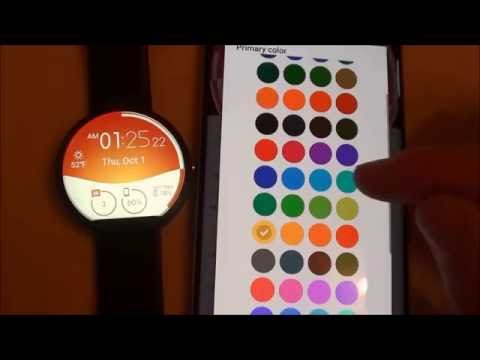

Morphing Watch Face
Contains adsIn-app purchases

star
1.39K reviews

Everyone
info
10K+
Downloads

Everyone
Learn more


About this app
Morphing Watch Face for Wear OS!
★ Features of Morphing Watch Face ★
- Morphing animations in interactive mode
- Choose design colors
- Day & Month
- Watch battery
- Mobile battery (requires phone app)
- Weather (requires phone app)
The settings of the watch face are located in the "Wear OS" app of your mobile.
Just hit the gear icon over the watch face preview and the settings screen will show up!
★ Settings ★
🔸Wear OS 2.X / 3.X / 4.X
- Choose design colors on watch & mobile
- Define heartbeat frequency refresh rate
- Define weather refresh rate
- Weather unit
- 12 / 24 hours mode
- Define interactive mode duration
- Choose the ambient mode b&w and eco luminosity
- Choose to display a leading zero on hours
- Choose to display or not the seconds dots
- Switch between éco / simple b&w / full ambient mode
- Data:
+ Change the indicator to display on the 3 positions
+ Choose between up to 8 indicators (Daily step count, Heartbeat frequency, Unread Email from Gmail, etc...)
+ Complication (wear 2.0 & 3.0)
- Interactivity
+ Access to detailed data by touching a widget
+ Switch the displayed data by touching a widget
+ Change the shortcut to execute on the 4 positions
+ Choose your shortcut among all applications installed on your watch!
+ Choose to display the interactive areas
🔸Wear OS 6.X
- Choose design colors
- Choose date format
- Display shortcuts or not
- Display watch indicators or not
- Complication data:
+ Set the data you want on the widgets
+ Touch the widgets to start the data activity if available
- Interactivity
+ Access to detailed data by touching a widget
+ Modify the shortcuts: choose your shortcut among all applications installed on your watch!
- ... and more
★ Additional settings on phone ★
- Notifications for new designs
- Access to support
- ... and more
★ Installation ★
🔸Wear OS 2.X / 3.X / 4.X
A notification will be displayed on your watch, right after your mobile installation. You just have to hit it to start the installation process of the watch face.
If the notification did not display for some reason, you can still install the watch face by using the Google Play Store available on your watch: just search the watch face by its name.
🔸Wear OS 6.X
Install the watch app to manage the watchface: the free version is automatically installed. Then use the "MANAGE" button in the top right shortcut of the watchface to update/upgrade your watch face.
★ More watch faces ★
Visit my watch faces collection for Wear OS on the Play Store at https://goo.gl/CRzXbS
** If you have any issues or questions, feel free to contact me by email (English or French language) before giving a bad rating. Thanks!
Website: https://www.themaapps.com/
Youtube: https://youtube.com/ThomasHemetri
Twitter: https://x.com/ThomasHemetri
Instagram: https://www.instagram.com/thema_watchfaces
Animated Interactive watch face with morphing animation and high customisation
Updated on
Safety starts with understanding how developers collect and share your data. Data privacy and security practices may vary based on your use, region, and age. The developer provided this information and may update it over time.
- No data shared with third partiesLearn more about how developers declare sharing
- This app may collect these data typesApp activity and App info and performance
- Data is encrypted in transit
- Data can’t be deleted


Ratings and reviews
1.3K reviews

A Google user
- Flag inappropriate
February 16, 2020
Thema has a major issue with his watch faces. They're so awesome when you buy one theres no reason to ever change it. Atomic was the 1st i bought. Two major selling points. Animations in the background, tons of color customizing, and like all his faces you can set up tapable areas how you want. I looked forever on facer for the perfect watchface with no luck. With Thema you set them up how you want. His customer support is spot on too! Keep them coming bro and i'll keep supporting. 5 stars!
13 people found this review helpful
A Google user
- Flag inappropriate
February 24, 2019
Not sure what'd changed, but I've had this face b4 & really wasn't a big fan- BUT NOW- I have it in my top 2 rotation of approx 35 paid & premium faces.. Colors can be changed enough to give you, really, a lot of control over how it looks. & a - 1 - DOLLAR? Are you kidding? The complications are overly simple, but this is a 'clean' style face so it works well. I've actually got about 7 or 8 premium/paid this dev's faces - they rock
3 people found this review helpful

Frank Grant
- Flag inappropriate
November 24, 2021
Awesome watch face, especially with the galaxy watch 4, great color options beautiful and bright, perfectly put together. Simple, yet so much going on. The animations are absolutely flawless. Im going to see what else this creator has cuz i looked over this watch face a ton of times and just said eh, now i know this creator is a master of their craft. The interface for it is so simple just put in your favorite colors and extras, turn on animations and prepare to be amazed. 👍👍
7 people found this review helpful
What’s new
2.26.09.0521
- Fix startup crash
- Bump wear compatibility target to 35
- Bump mobile compatibility target to 36
- Fix wear app install status
- Bump library versions
Requires app update on both Watch & Mobile.
If you have any issue, please let me know by email at thema.apps@gmail.com
- Fix startup crash
- Bump wear compatibility target to 35
- Bump mobile compatibility target to 36
- Fix wear app install status
- Bump library versions
Requires app update on both Watch & Mobile.
If you have any issue, please let me know by email at thema.apps@gmail.com
Everyone
Learn moreApp support
About the developer
HEME Thomas
thema.apps@gmail.com
7 Rue Alfred Sisley
78370 Plaisir
France


